A tutorial, the download and screenshots are available here: Diving Log Viewer
I'm interested about your opinion, comments, bug reports and questions, so please feel free to post.

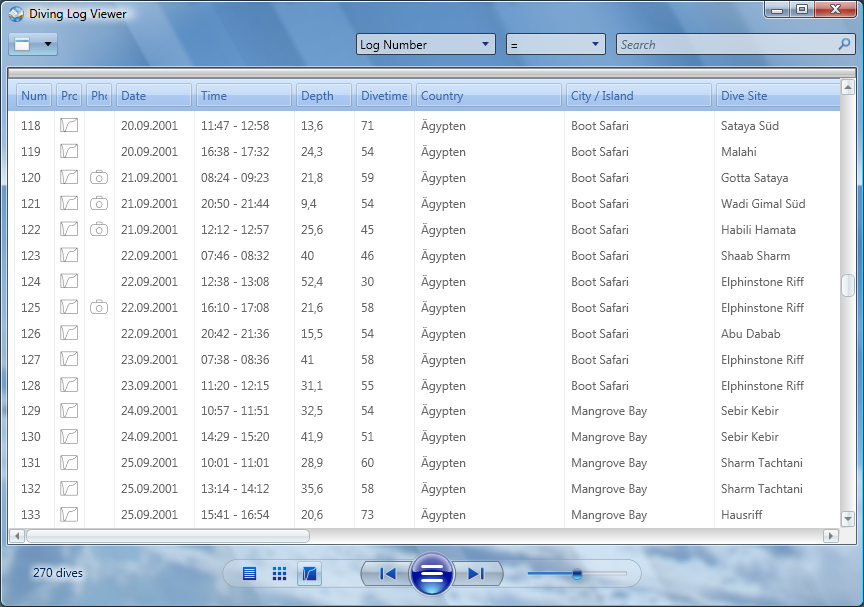

Yes, I experienced this also on a slower laptop, but I think I can solve this with multithreading.1. The real-time screen updating is a little slower than the equivalent you get in, say, MS-Outlook 2007 searches. Maybe this is just the feedback on keystrokes as they are entered into the search box. Sometimes there is a delay of a second or so before the character in the search box displays correctly. It gives a slight impression of the search being slow, though in reality it isn't really.
Yes, some kind of dive log page is planned, but will not be included in the next update because I'm not yet sure how to arrange the items. Most of the dive data is already displayed in the grid, so this is not so high priority.2. Double clicking on a dive entry should display a dive log screen. I am sure this is coming in the next release with the dive profile etc, so I won't go on about this. Other than to say I agree that this will be a very welcome addition, and I am sure it will be difficult to get the usability and simplicity of this working properly given all the data to display.
That's interesting! I saw the German labels in the comments reader here on my development system and thought that the text came from the .NET Framework, and that on an English framework they would be in English. It seems that this is not the case and I have to translate them. Thank you for this hint! When you right click into the comments and onto a scrollbar, is the text of the context menu also German?3. Some prompts are in German (page count says "1 von 1"). Not so friendly for the English-only speakers (like me!) out there!
You're right, I've fixed that now.4. Drop-down field chooser box lists "Repetive". Should this be "Repetitive"?
I forgot to mention that the startup time for the software is also quite slow - less than 10 seconds but more than 5. I ended up starting it 4 times because I thought I'd not clicked it right!!Yes, I experienced this also on a slower laptop, but I think I can solve this with multithreading.
Right-click on the scroll bar produces English, as does right-click in the comments. Also the comments and photos icons at the bottom produce English prompts when you hover over them. But the 3 icons at the bottom right hand side produce Seitenmodus, Zwei-Seiten-Modus and Blattermodus when you hover!That's interesting! I saw the German labels in the comments reader here on my development system and thought that the text came from the .NET Framework, and that on an English framework they would be in English. It seems that this is not the case and I have to translate them. Thank you for this hint! When you right click into the comments and onto a scrollbar, is the text of the context menu also German?
Ah yes, it starts quicker second time round under XP.The start-up time is one general problem with the .NET Frameworks. I can't do much here, because it's not the viewer which is slow, it is the first launch of the framework after a reboot.
I've experimented with grouping of numeric fields (dive time and depth) and found out that it doesn't make sense because of the slight changes in the values. So you end up with a lot of groups with only one or two dives inside. But you're right, grouping of the tank size should work, because there are not so much different tank sizes, I'll add this field, too.1. You can't group by every field, which is a little frustrating. So, for example, the first test I wanted to do was to group by tank size (I vary between 12 and 15). But it isn't there! Can all the fields be made available for grouping?
The data grid is a 3rd party control and the layout and behaviour of the grouping is not controlled by me. I agree that dragging the real header would be more intuitive, but this is unfortunately not supported by this grid at the moment (but maybe in future, we will see). The WPF technology is just at the beginning.2. The list of fields is long and horizontal. It's a little difficult to read across them. Might it be possible simply to drag the column headings up into the grouping area instead? I think that might be simpler (less clutter on the screen) and more intuitive (dragging the headings from directly above the relevant data values).
This is a good idea and I think it should be possible (I'll have to take a look first if the grid supports this).3. When I uncheck the "group by area" item in the top left menu, the grouping fields disappear, but the data grouping remains. I had expected it to ungroup and go back to normal display, but to do that I need to remove each grouping field manually. Would it be more intuiting for the unchecking of "group by area" to remove all grouping?
Hi AlastairAlso, I forgot to mention that, with DL and the viewer both running at the same time, the viewer does not pick up data updates made in DL unless you close & open the dive log file.
That makes sense, ta. How about adding Weight to the groupings list while you're at it? Although this can be recorded in decimal places, it's very often the same value for obvious reasons.I've experimented with grouping of numeric fields (dive time and depth) and found out that it doesn't make sense because of the slight changes in the values. So you end up with a lot of groups with only one or two dives inside. But you're right, grouping of the tank size should work, because there are not so much different tank sizes, I'll add this field, too.
